


For service providers using Microsoft Azure to serve their clients, SOC 2 compliance is the gold standard that accelerates your sales cycle. Enterprises loathe spending weeks vetting a vendor with hundreds of security questionnaires; instead, they choose an organization with a SOC 2 report.
Microsoft Azure offers a SOC 2-compliant foundation with a wide range of security and compliance tools. However, you’re responsible for configuring and managing your security settings, access controls, and applications. If you fail to translate abstract SOC 2 criteria (logical access, change management, continuous compliance) into concrete Azure configurations, you’re in for a big audit surprise (not a pleasant one).
This guide will walk you through the what and why of Azure SOC 2 compliance, the native tools that map to SOC 2 criteria, and the solutions to overcome common challenges.
Azure SOC 2 Compliance: An Overview
A common misconception among many organizations: “If I host on Azure, and Azure is secure, then I am compliant.”
The truth is, Azure SOC 2 compliance is about demonstrating that your specific cloud usage is secure.
While Microsoft demonstrates that its Azure cloud services are compliant through a SOC 2 Type 2 report (accessible via the Microsoft Service Trust Portal), it doesn’t automatically mean that you are compliant, too.
For the auditor, Azure is a subservice organization. This means you can rely on their controls for physical infrastructure, but you can’t simply show Microsoft’s SOC 2 report to the auditor or your clients as proof of your own security. You must also undergo an independent SOC 2 audit and get your controls attested.
This brings us to the Shared Responsibility Model. In this framework:
- Microsoft ensures security “of” the cloud, which includes components such as physical data center, network layer, and hardware infrastructure.
- At the same time, you are responsible for securing what’s “in” the cloud. That is, the part of the cloud you control, the logical layers, including data, identities, and apps.
This distinction is often where teams struggle.
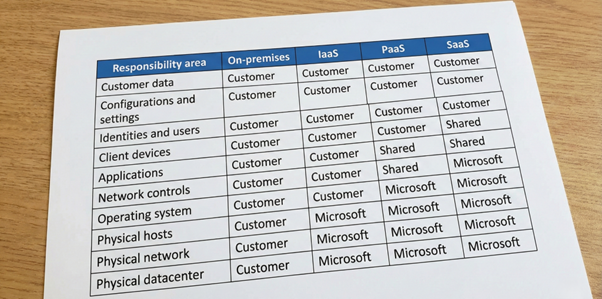
Figure 1: Shared Responsibility Model
Auditors will verify that the controls you have built on top of Azure meet the rigorous Trust Services Criteria (Security, Availability, Processing Integrity, Confidentiality, and Privacy).
Here are some examples of controls you need to implement:
- Virtual Machine (VM) hardening: Ensuring no unauthorized ports are open.
- Data protection: Implementing key management for encryption and data classification.
- Identity and Access Management (IAM): Tightly managing who has administrative privileges via Entra ID (formerly Azure Active Directory), using Role-based Access Control (RBAC), and implementing Multi-Factor Authentication (MFA).
- Governance: Using Azure Policy to enforce configuration baselines.
While Azure lays the foundation of physical security, you must build your own layer of data protection for the cloud components you use.
Importance of Azure SOC 2 Compliance for Enterprises and Highly Regulated Industries
Why is mastering this compliance for the Azure cloud deployment so urgent for mid-to-large businesses?
For organizations in regulation-heavy sectors, such as healthcare, fintech, and critical infrastructure, the Azure environment is dynamic. Resources are automatically spun up and down, and dev teams deploy code daily. In such a fluid environment, static security measures fail due to a lack of scalability.
Achieving Azure SOC 2 compliance is less about checking audit checkboxes and more about demonstrating continuous security to your prospects. That’s where a SOC 2 Type 2 report becomes your savior.
Whether you’re a SaaS company or a vendor offering other cloud-based services, a clean SOC 2 report helps you build trust and gain a competitive advantage.
Here’s how a SOC 2-attested Azure environment converts into business benefits:
- Sales enablement: For many B2B enterprises, a SOC 2 report is a non-negotiable requirement for closing deals with enterprise clients. Large organizations often refuse to onboard vendors who cannot provide tangible proof of security, making third-party attestation a necessity.
- Faster procurement cycles: Security reviews are often the biggest bottleneck in the sales process. Having an attested SOC 2 report allows you to bypass lengthy security questionnaires, reducing the time to seal contracts from months to days.
- Cost-efficient operations: A compliant cloud is a standardized one. By enforcing SOC 2 controls, you reduce resource sprawl and the noise of unmanaged alerts. This lowers operational overhead and reduces wasted efforts by security teams.
- Risk mitigation: Compliance forces you to proactively address security gaps, such as vulnerability backlogs and unpatched systems. Meeting SOC 2 criteria for your Azure environment drastically reduces your attack surface and breach risk. Not only do your clients, but also your business, feel the brunt of security incidents.
- Trust building: A compliant Azure deployment demonstrates to your stakeholders that you’re committed to security. It offers objective proof that their customer data is safe in your hands.
However, trying to meet SOC 2 requirements manually can be overwhelming. Juggling spreadsheets and screenshots to triage alerts and collect evidence is no longer sustainable. Ensuring that every Azure resource remains compliant requires deep expertise and constant vigilance. These are the real challenges that drive organizations to seek a faster, AI-driven solution to achieve Microsoft Azure SOC 2 compliance.
Core Components of Azure SOC 2 Compliance
Here’s an overview of how Azure services map to SOC 2 criteria:
SOC 2 trust principle | Suitable Azure components | Leverage Azure for SOC 2 compliance |
Security (Common Criteria) | Entra ID, Policy, Defender for Cloud, Sentinel | Protect against unauthorized access via RBAC/MFA/PIM and enforce baseline security policies. Continuously monitor security posture and proactively detect and mitigate threats. |
Availability | Monitor, Backup & Site Recovery, Log Analytics | Track system uptime, performance health, and resource utilization to ensure the system meets operational SLAs. Implement automated backups and change management procedures. |
Confidentiality | Key Vault, Managed Disks | Encrypt data at rest (on disks) and in transit (via TLS). Manage keys to ensure only authorized users can read sensitive data. |
Processing Integrity | Policy, Template Specs | Prevent configuration drift and ensure consistent deployment for every resource. |
Privacy | Entra ID, Policy, Key Vault | Implement privacy by design using RBAC, manage data retention/deletion policies, and encrypt sensitive personal information (PII) to prevent unauthorized disclosure. |
SOC 2 auditors don’t trust theory; they verify compliance by assessing your actual cloud security controls. To clear the audit, you need to demonstrate that your Azure environment is locked down in practice. That requires a defense-in-depth approach built on the following critical pillars.
1. Identity and access management
In the cloud, identity is the new perimeter. SOC 2 requires strict access controls to ensure only the right people get in (Common Criteria 6.1).
Microsoft Entra ID is your primary tool here. To meet SOC 2 standards, you must configure its baked-in safeguards:
- Role-Based Access Control (RBAC): Implement “Least Privilege” access. Instead of granting broad “Contributor” rights, use granular roles that limit users to only the specific actions they need for their jobs.
- Multi-Factor Authentication (MFA): Auditors expect MFA to be enforced for all administrative access to prevent credential theft. Entra ID’s MFA feature adds an extra layer of authentication beyond passwords, using methods such as authenticator apps, SMS, or biometrics.
- Conditional access: Your intelligent gatekeeper. It enforces context-aware policies—such as requiring a compliant device or blocking access from specific locations—before a user is even allowed to authenticate. If there is a possibility of compromise, it acts in real time by blocking access or prompting for MFA.
- Privileged Identity Management (PIM): For critical tasks, access should be “just-in-time” rather than permanent. PIM allows you to grant temporary privilege elevation, creating an audit trail of exactly who requested access and why.
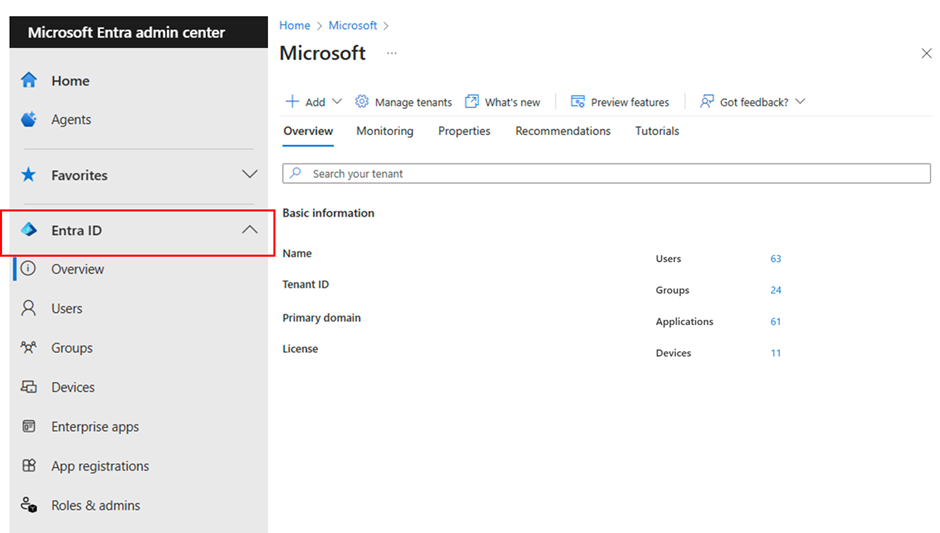
Figure 2: Microsoft Azure Entra ID Preview
2. Data Protection & Encryption
While IAM secures the door, encryption secures the vault. To meet SOC 2’s Security and Confidentiality criteria, you must demonstrate that sensitive data is unreadable to unauthorized users, both in transit and at rest.
- Centralized key storage: Azure Key Vault securely stores and manages cryptographic keys and secrets (passwords, certificates). Not even your admins can access sensitive data, such as passwords, business secrets, and financial records, without authorization.
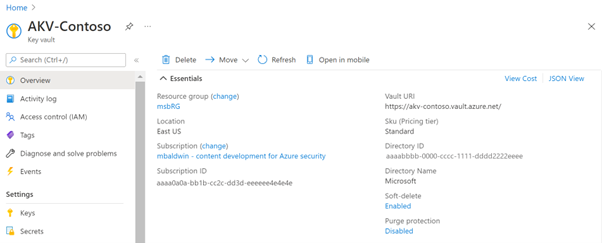
Figure 3: Microsoft Azure Key Vault Preview
- Encryption at rest: Your sensitive data shouldn’t just be stored; it should be scrambled. Azure Managed Disks ensures this by offering several encryption options (SSE, ADE, CDE). This renders data useless to anyone attempting physical theft or improper disposal.
3. Governance and Configuration
SOC 2 requires you to prove that your environment doesn’t drift into non-compliance over time. You need automated mechanisms to prevent unauthorized changes to cloud configurations.
- Automated governance: Azure Policy enforces policies in your environment. It imposes rules—such as denying the creation of public IPs or requiring specific tags—to ensure that resources are born compliant and stay compliant without manual intervention.
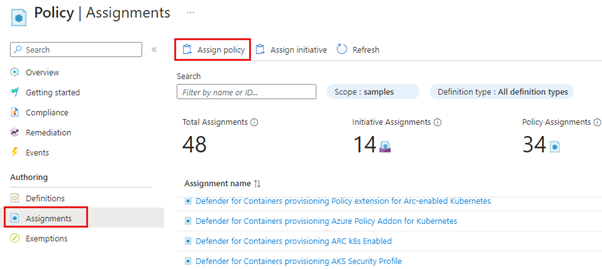
Figure 4: Microsoft Azure Policy Preview
- Standardized environments: You don’t need to build everything from scratch. Azure Template Specs allows you to store and reuse your Infrastructure-as-code (IaC) configurations as Azure Resource Manager (ARM) templates. This means that every new subscription or resource group is activated with SOC 2 controls already baked in, eliminating the risk of human error.
- Pro tip: For a scalable foundation, deploy an Azure Landing Zone. This architectural framework includes SOC 2-aligned policies, networking, and preconfigured identity controls, ensuring your environment is audit-ready from day one.
4. Security Posture Management
Auditors want to know if you are continuously monitoring your compliance status, not just checking it once a year.
- Real-time operational security: Microsoft Defender for Cloud provides real-time visibility into your Azure environment by continuously scanning for misconfigurations and compliance gaps. It also detects threats such as malware, ransomware, and advanced persistent threats (APTs), with prioritized recommendations and automated workflows to fix issues from code to the cloud.
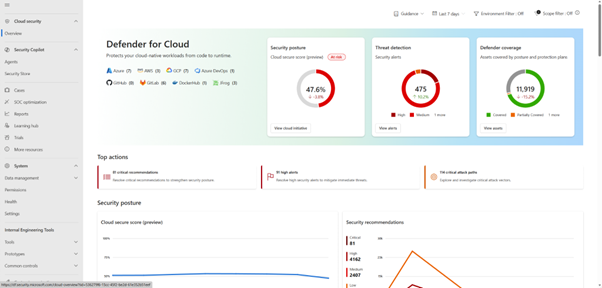
Figure 5: Microsoft Defender for Cloud Preview
- AI-driven SIEM/SOAR platform: Microsoft Sentinel is a cloud-native and AI-powered Security Information and Event Management (SIEM) and Security Orchestration, Automation, and Response (SOAR) solution. It helps you demonstrate Azure SOC 2 compliance by facilitating:
- Continuous security monitoring with customizable dashboards.
- AI-driven threat detection and analytics.
- Context-based alert investigations to help with proactive threat hunting.
- Incident response and automation (SOAR) with automated playbooks.
- Auto-generated audit reports for security standards (SOC, PCI DSS, GDPR, NIST).
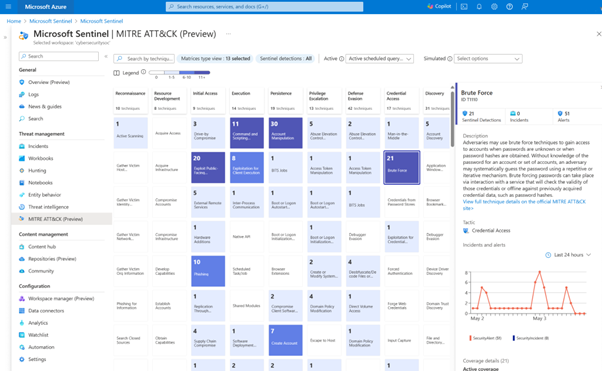
Figure 6: Microsoft Sentinel Threat Detection Preview
5. Logging and Monitoring
If IAM is about prevention, logging is about proof. SOC 2 criteria (specifically CC7.2) require you to monitor your system for anomalies, track changes, and retain evidence of system activity.
- Availability monitoring: Azure Monitor serves as the central hub for collecting telemetry from your applications and infrastructure (on-premises and in the cloud). It tracks performance, infrastructure health, and resource utilization, enabling proactive issue detection, alerting, automated response, and system-wide visibility for developers and security teams. This ensures you meet the Security, Availability, and Processing Integrity trust principles of SOC 2.
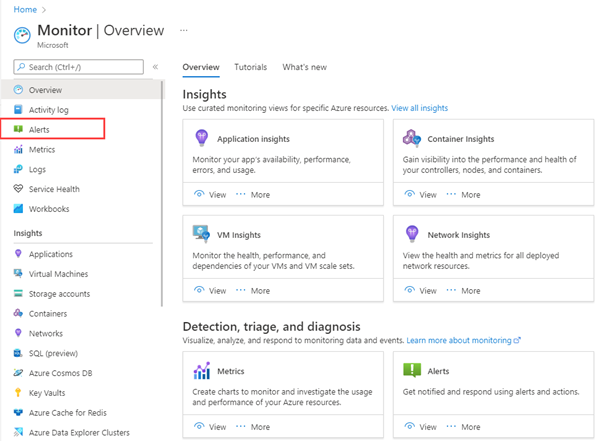
Figure 7: Microsoft Azure Monitor Alerts Preview
- Change tracking: Part of Azure Monitor, the Activity Log is your source of truth. It automatically captures every control-plane event from virtually every service across your Azure estate. Whether it’s VM creation/deletion, changes to network security group rules, or new code deployments, it’s recorded. When analyzed via Azure Log Analytics, it provides real-time dashboards with granular audit trails, which are essential for SOC 2.
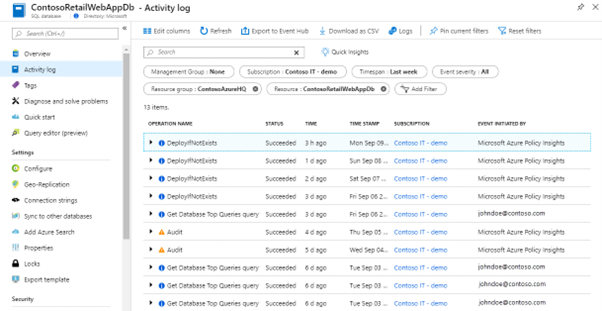
Figure 8: Microsoft Azure Activity Log Preview
The challenge: While these tools are powerful, they generate a massive volume of data. For many SOC teams, the problem isn’t collecting the logs; it’s making sense of them during an audit. This is where manual review often fails and where automated compliance mapping becomes essential.
Evidence Collection and Audit Preparation
Configuring your Azure for SOC 2 compliance is only half the battle. The other half is the difficult task of proving it.
An auditor doesn’t stop at checking your Azure portal. They also expect you to provide a structured trail of evidence demonstrating that your controls were continuously effective throughout the entire audit period (usually 6 to 12 months). The gap between “having logs” and “having evidence” is where most SOC 2 audits fall flat.
Traditionally, compliance teams have relied on manual evidence collection, taking hundreds of screenshots, downloading CSVs, and chasing tickets. It’s risky because:
- It is point-in-time: It only proves you were compliant the other day, not throughout your assessment period.
- It is time-consuming and error-prone: Manual sampling takes weeks, and the auditor may find a misconfigured resource your team missed.
Azure tools for audit-ready evidence
To survive an audit without drowning in drudgery, you must use Azure’s built-in tools for audit preparation:
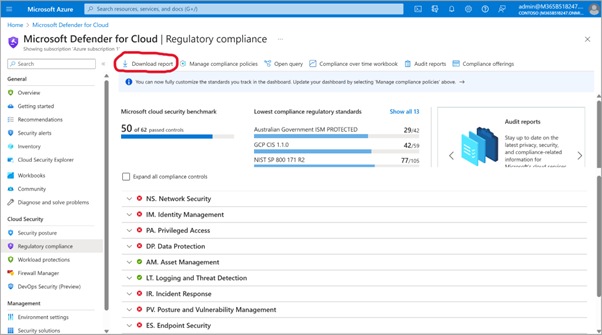
Figure 9: Microsoft Regulatory Compliance Dashboard Preview
- Purview Compliance Manager: It’s like an audit command center. It replaces Excel with pre-built Assessment Templates (like SOC 2) that map technical configurations to SOC 2 controls. It provides a comprehensive audit-level view (e.g., “SOC 2 Control CC6.1 is 70% complete”) by organizing manual evidence (like HR policies) and aggregating technical scores.
- Regulatory compliance dashboard: Located within Defender for Cloud, this gives you a real-time, resource-level view (e.g., “VM-1 is missing disk encryption”). It specifically monitors your Azure workloads’ technical compliance with various regulations and standards, and suggests actions to address configuration gaps that could lead to non-compliance findings.
- Pro tip: Download the Regulatory Compliance Report (CSV or PDF). This is your primary artifact, showing exactly which resources passed checks (like encryption or network security) on any given date.
- Monitor & Sentinel logs: Default retention (30-90 days) fails the 6-12 month SOC 2 Type 2 requirement.
- Pro tip: Configure diagnostic settings to export logs to an Azure storage account (archive tier). When an auditor asks for logs from 8 months ago, you can pull them out instantly. Also, export Sentinel incident reports to prove you responded to threats.
- Entra ID logs: Export sign-in logs (MFA enforcement) and access control logs (provisioning/deprovisioning) for IAM evidence.
- Pro tip: Retain these logs for at least 365 days in a Log Analytics workspace, as the default retention is often too short for a full audit cycle.
- DevOps pipelines: If using Azure DevOps or GitHub, your pull request (PR) history is your evidence for change management. Enforce branch policies requiring “peer review” before merging, as auditors review commits for the “Approved By” stamp.
The reality check: While these native tools provide the raw data, they don’t organize it. You are left with folder structures full of disjointed PDFs and CSVs that need manual mapping to specific SOC 2 controls. That’s why many organizations are shifting toward autonomous compliance platforms like Transilience that automatically collect compliance evidence from your cloud and map every artifact to the relevant SOC 2 requirement.
Common Pitfalls in Azure SOC 2 Compliance (With Solutions)
Even with strong Azure support, the path to SOC 2 is full of traps that can delay your audits or result in a “qualified” opinion (audit failure).
Here are the most common missteps and how you can overcome them:
1. Compliance responsibility
- The problem: Many organizations mistakenly assume that, because Azure is SOC 2 compliant, their cloud deployment is as well. In reality, Microsoft only secures the underlying physical infrastructure, while you’re responsible for what you build on top of it.
- The fix: Explicitly document the shared compliance model—Azure’s provisions vs. your obligations. Auditors typically use a “carve-out” method, accepting Azure’s report on physical-layer security but strictly testing the controls you manage (identity, data, and configuration).
2. Scope boundary
- The problem: Vague scope definitions invite auditors to inspect unrelated systems, leading to surprise findings.
- The fix: Be precise. Define your scope by specific Azure subscriptions and resource groups. If a resource is out of scope (e.g., a dev environment), document the rationale clearly to prevent unsettling questions later.
3. Evidence retention
- The problem: SOC 2 Type 2 audits verify ongoing compliance, usually spanning 6-12 months. If you rely on Azure’s default 30-90 day retention, your evidence will vanish before the auditor arrives.
- The fix: Configure your retention policies to store logs for at least 12 months and ensure diagnostic logging is enabled for all in-scope resources to guarantee evidence is available.
4. Configuration drift
- The problem: Compliance is not static. A firewall rule that was compliant two months ago might be broken by a hurried deployment today. Relying on manual periodic checks leaves you vulnerable to these gaps.
- The fix: Leverage Azure Policy or a continuous compliance monitoring solution (like Transilience) to detect and remediate drift the moment it occurs, rather than letting it accumulate and show up in the quarterly review.
5. Manual processes
- The problem: Traditional SOC teams rely solely on human oversight, which introduces errors and inconsistencies as your compliance needs scale. In a dynamic cloud environment, manual checks are often too slow or sporadic to catch issues before they become audit failures.
- The fix: Shift to AI-driven automation to continuously monitor compliance gaps, with auto alerts and remediation suggestions. Periodic human verification no longer works in a constantly changing cloud; you need 24/7 machine vigilance to ensure sustained control effectiveness over the long term.
Achieving Microsoft Azure SOC 2 Compliance
For modern service organizations, Azure SOC 2 compliance is more than a “nice-to-have”; it’s a business enabler that opens doors to enterprises. However, many teams struggle to close the gap between Azure’s agility and their traditional approach.
While your engineering team deploys code daily, manual compliance processes remain stuck in the past. This creates a dangerous “Trust Gap”—a blind spot between audit cycles where your actual security posture drifts away from your documented controls.
Your enterprise customers will demand real-time assurance on paper. A failed audit not only undermines your security efforts but also becomes a business liability, delaying deals and deterring customers.
To turn compliance from a manual burden into a competitive advantage, you must eliminate the friction separating your security data from the auditor.
Automate your path to SOC 2 with Network Intelligence
That’s precisely why forward-thinking organizations are moving beyond a last-minute scramble. Transilience, the human-led, AI-powered platform from Network Intelligence, bridges the gap between your Azure environment and your auditor.
By integrating directly with your Azure stack, Transilience’s AI agents:
- Continuously assess security: Perform real-time security assessments to ensure 24/7 visibility into your attack surface, not a periodic snapshot.
- Prioritize vulnerabilities intelligently: Cut through the noise with AI-driven vulnerability prioritization, so your team can focus on the risks that matter most.
- Automate evidence collection: Pull configurations and logs from your Azure cloud instantly and map them to specific SOC 2 controls.
- Monitor compliance constantly: Detect configuration drift in real time (not just quarterly) so you always remain audit-ready.
- Eliminate the grind: Free your team from the administrative burden of compliance so they can focus on innovation and business growth.
Get future-proof by demonstrating robust security. Talk to our experts or request a demo to learn how you can ace compliance audits for SOC 2, PCI DSS, HIPAA, GDPR, and more.